SmartShop 4.55.0 -> 4.57.0
Another version released while I was checking this out! Be on the lookout for a new post :)
Hi again! Recently, I noticed Sainsbury’s released a new version of SmartShop on their handsets - 4.57.0.
As usual, I tried to get the APK so I could look into what changed. But it seems they broke one of the ways to escape the app :(
Maybe the devs finally found out people can escape1? Either way, I got the APK for my collection2.
Today I will be showing you what happened between 4.55.0 and 4.57.0, with my very very limited Java understanding. Basically all but one of these are internal changes, so don’t expect anything you can see immediately.
MQTT now has TLS
I never talked about this in the last post, but SmartShop uses MQTT to report which devices are docked or in use, or to reboot them. The MQTT broker they connect to is configured at compile time.
SmartShop also has a diagnostics menu which shows if MQTT is connected, the device’s IP, MAC, etc.
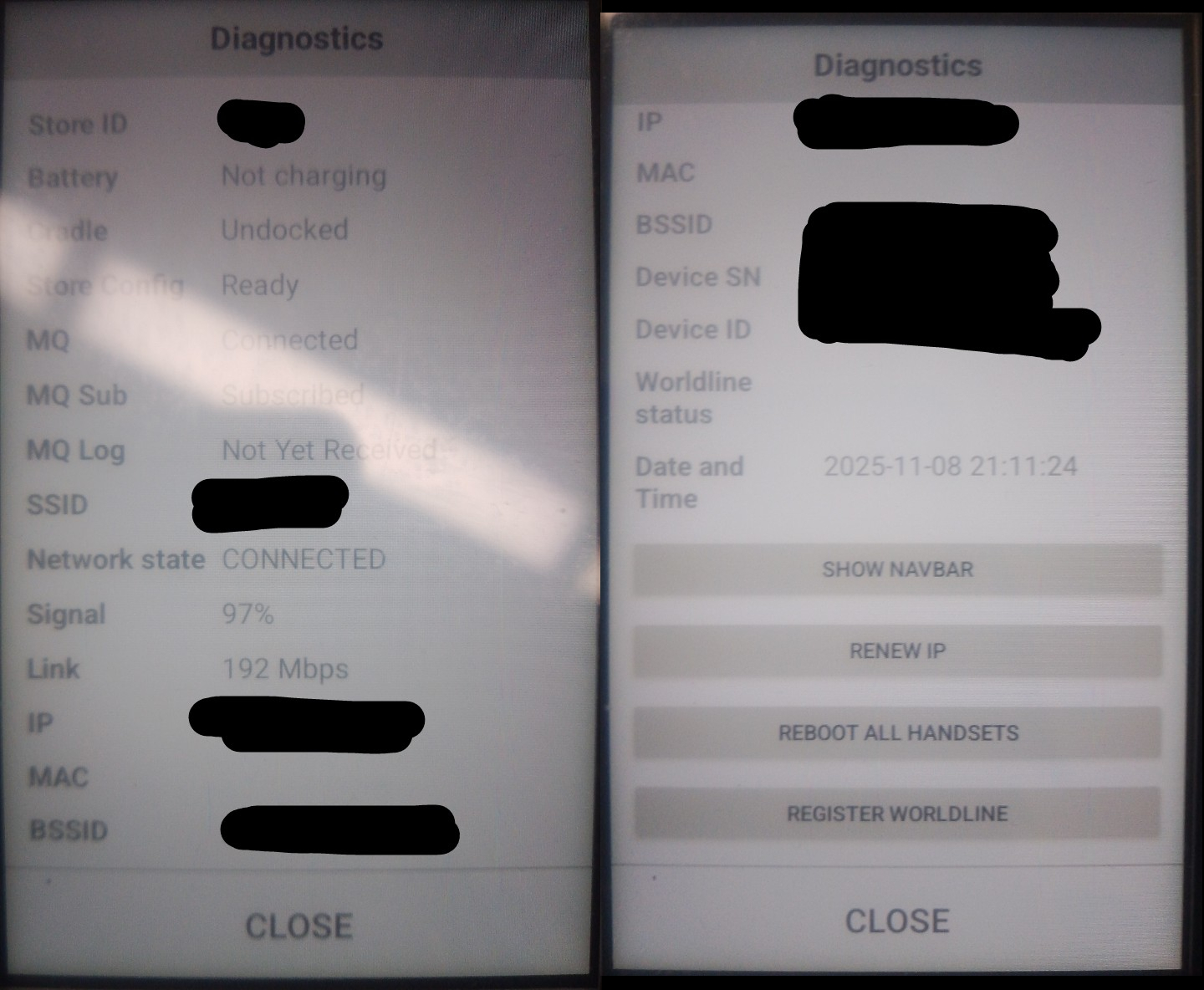
But only now do they add an “MQ Server” entry to the diagnostics info shown:
<!-- res/layout/dialog_diagnostics.xml -->
    </LinearLayout>
    <LinearLayout style="@style/DiagRow">
        <TextView
            android:text="MQ Server"
            style="@style/DiagKey"/>
        <TextView
            android:id="@+id/mqtt_server"
            style="@style/DiagValue"/>
    </LinearLayout>
    <LinearLayout style="@style/DiagRow">
        <TextView
            android:text="MQ Sub"
            style="@style/DiagKey"/>
But what changed that they feel like being able to view the address now?
Point your attention to the com.sainsburys.ssa_handset.utils.MQTTUtils class:
 public final class MQTTUtils {
+    public static final int $stable;
+    private static String BROKER_ADDRESS;
+    private static final MQTTTYPE DEFAULT;
     public static final MQTTUtils INSTANCE = new MQTTUtils();
-    private static String PORT_NUMBER = "1883";
-    private static String BROKER_ADDRESS = BuildConfig.MQTT_BROKER_ADDRESS;
-    private static String PROTOCOL = "tcp://";
-    public static final int $stable = 8;
+    private static String PORT_NUMBER;
+    private static String PROTOCOL;
The port number and protocol are no longer hardcoded to 1883 and plain TCP. This makes sense because
a new (sub?)class, MQTTTYPE, describes insecure MQTT and MQTT over TLS:
    public static final class MQTTTYPE {
        private static final /* synthetic */ EnumEntries $ENTRIES;
        private static final /* synthetic */ MQTTTYPE[] $VALUES;
        private final String port;
        private final String protocol;
        public static final MQTTTYPE SECURE = new MQTTTYPE("SECURE", 0, "8883", "ssl://");
        public static final MQTTTYPE INSECURE = new MQTTTYPE("INSECURE", 1, "1883", "tcp://");
     }
After adding MQTTTYPE, the devs added a static block to MQTTUtils.
This sets up values that every instance of the MQTTUtils class will use, and instead of just hardcoding the
port and protocol, it uses the connection type instead (insecure/secure):
    static {
        MQTTTYPE mqtttype = MQTTTYPE.SECURE;
        DEFAULT = mqtttype;
        PORT_NUMBER = mqtttype.getPort();
        BROKER_ADDRESS = BuildConfig.MQTT_BROKER_ADDRESS;
        PROTOCOL = mqtttype.getProtocol();
        $stable = 8;
    }
So just like I said, SmartShop uses TLS for its MQTT traffic now! Though I can’t confirm this until I find out how to see diagnostics again.
Worldline APIs
Worldline is the payment tech provider for Sainsbury’s till-free checkout system, which we’ll call “pay-on-handset”. There was already code for this feature, but this update adds two new API endpoints:
// sources/com/sainsburys/ssa_handset/data/service/PayOnHandsetService.java
@PUT("storeinfo/store/{store_id}/terminal/{terminal_uuid}")
Object reportWorldlineTerminalUuid(@Path("store_id") String str, @Path("terminal_uuid") String str2, @Body WorldlineRequest worldlineRequest, Continuation<? super Unit> continuation);

@PUT("storeinfo/store/{store_id}/worldline-registration-token")
Object sendAsyncWorldlineRegistration(@Path("store_id") String str, @Header(WebserviceConstants.HEADER_X_STORE_ID) String str2, @Body WorldlineRequest worldlineRequest, Continuation<? super Unit> continuation);
These are used by the device to register with Worldline so it can be used to process payments, or something. I honestly don’t know.
I can’t use these endpoints properly, because the only store that supports this is too far. But I looked into them anyway.
reportWorldlineTerminalUuid
This function sends a PUT request to storeinfo/store/{store_id}/terminal/{terminal_uuid}. It takes two path parameters (store_id, terminal_uuid) a body of the WorldlineRequest type.
store_id is easy to find, but you must use a store that supports pay-on-handset. Checking this3 copy of the app’s Firebase Remote Config shows, in the enable_customer_handset_poh flag, that 0514 will work.
terminal_uuid wasn’t as obvious, so I had to read. Searching terminaluuid in the code pointed to the WorldlineResponse type, which indeed has a field for the UUID. The endpoint that references this is… 2 lines above where I was looking:
// sources/com/sainsburys/ssa_handset/data/service/PayOnHandsetService.java
@GET("storeinfo/store/{store_id}/worldline-registration-token")
Object getWorldLineRegistrationToken(@Path("store_id") String str, Continuation<? super WorldlineResponse> continuation); // <--- RIGHT FUCKING HERE
And finally, the body of type WorldlineRequest is just JSON witn the device’s serial number:
{"serial_number": "123456"}
Great we know what to do! Just get a UUID with the other endpoint first:
// GET storeinfo/store/0514/worldline-registration-token
{
  "terminal_id": "51037971",
  "terminal_uuid": "330be4fe-a74a-46be-80e5-e5787c2d7993",
  "token": "07531106"
}
Then register our terminal:
// PUT storeinfo/store/0514/terminal/330be4fe-a74a-46be-80e5-e5787c2d7993
// Body:
{"serial_number": "1"}
It gives a 204 No Content response. Underwhelming, but it is what it is.
sendAsyncWorldlineRegistration
This function sends a PUT request to storeinfo/store/{store_id}/worldline-registration-token. It responds with 202 Accepted4.
Not much else to say.
Worldline MQTT commands
Back to the MQTT system, we have two new topics.
         private static final /* synthetic */ Topic[] $values() {
-            return new Topic[]{AVAILABLE, STATUS, UNLOCK, LOCK, REMOVED, BLOCKED, STATE, WALLS_STATE, VERSIONS, DEVICES_COMMANDS};
+            return new Topic[]{AVAILABLE, STATUS, UNLOCK, LOCK, REMOVED, BLOCKED, STATE, WALLS_STATE, VERSIONS, DEVICES_COMMANDS, WORLDLINE_REGISTER, WORLDLINE_UNREGISTER};
         }
WORLDLINE_REGISTER is Worldline/Register, but the app seems to subscribe to /[serial number]/Worldline/Register. The messages sent to this topic
are basically the same as GET storeinfo/store/0514/worldline-registration-token from earlier - terminal_id, terminal_uuid and token, which is then used
to register with Worldline. At least I think so.
WORLDLINE_UNREGISTER is Worldline/Unregister (totally surprising), which is used to subscribe to /[store id]/Worldline/Unregister.
Coupon redemption endpoint
For pay-on-handset stores, you can redeeem coupons now.
There are new strings related to this:
<string name="coupon_redemption_scan_title">Scan the coupon\nbarcode to redeem</string>
<string name="coupon_redemption_scanning_title">Scanning coupon…</string>
<string name="poh_coupons">Coupons</string>
The Firebase config flag coupon_redemption_enabled is now in the code. At the time of writing I checked the config and cannot see it. Maybe they haven’t even released the feature?
And most importantly, the API endpoint - POST shop/api/v1/shops/{shopId}/payments/coupon-redemption! I haven’t gotten it to work, but I can tell you what it expects.
Aside from filling in {shopId}, you need to provide the X-User header which is likely your user ID
(from GET identity/api/v1/users/me). Then provide this body:
{
    "redemption_code": "<coupon barcode>",
    "store_id": "1234"
}
Which gives this response:
{
    "bonus_points": 0,
    "coupon_type": "string" // I don't know the real value
    "is_valid": true,
    "money_off": 0,
    "points_multiplied": 0
}
Unfortunately as I said before, the only store that can do this is really far. So I can’t check out the UI or anything.
Other stuff
Changes I have very little to say on:
- UI changes to padding and fonts, but you can see that by visiting a store
- The code that shows snow on Christmas is gone
And that sums up the major changes, in my view. Thank you for reading!
I’m not too sure what to do next. If I’d like to do something crazy like get the app running on non-Zebra devices, or just talk about things I haven’t pointed out yet. We shall see :)
-
TikTok user @gingerpellet shows this multiple times: https://www.tiktok.com/@gingerpellet/photo/7543337434122063126 ↩︎
-
I haven’t uploaded to archive.org for months, but if you want all the APKs, just ask. I don’t bite. ↩︎
-
You can find store IDs in the browser easily, but this laptop isn’t too good with Jadx and Firefox open. ↩︎
-
I like the way they use HTTP response codes :) ↩︎