BT InLink number blacklist stats
Background
Across the UK, BT has units providing free phone calls, free Wi-Fi and two giant advertising screens called Street Hubs. I previously posted about the older variant of these (from when they were called InLink), but today I’m focusing on the phone call feature.
As you might guess, providing phone calls for free to anyone on the street can lead to abuse. So BT acted and introduced automatic blocking of suspicious numbers.
The blacklist
The Android tablets you use to make calls on these are filled with files called blacklist.json or blacklist-[digits].json files.
Unfortunately, the system is so locked down I couldn’t inspect these before and never knew the purpose. :(
But 3 days ago, I got the list! And I believe this is what Street Hubs use to check if they call a number.
Overview
Here’s the list, but without the phone numbers. It would be kind of silly to just drop those:
{
  "name": "Default",
  "black_list": [
    {
      "type": "NumberBlocks",
      "start_time": "00:00",
      "description": "Block specific mobiles on ALL sites",
      "end_time": "23:59",
      "day": "[0-6]",
      "dialog": "CALL BLOCKED: This action was blocked. We restrict certain calls to protect our community if we believe it may be associated with unusual activity. Tell us if you think we made a mistake streethub@bt.com",
      "site_id": ".*",
      "number_patterns": [
        "^(0|\\+44|0044)(a|lot|of|numbers)"
      ]
    },
    {
      "type": "MobileBlocks",
      "start_time": "00:00",
      "description": "Block all mobile calls on SPECIFIC Sites, 24hr",
      "end_time": "23:59",
      "day": "[0-6]",
      "dialog": "Sorry, calls to Mobile phones are restricted from this StreetHub",
      "site_id": "(?i)uk-002385|uk-002387|uk-002412|uk-002445|uk-002404|uk-002489|uk-002473|uk-002480|uk-002511|uk-002499|uk-002495|uk-002501|uk-000013|uk-046904|uk-001130|uk-002518|uk-000025|uk-001134|uk-001202|uk-001511|uk-001335|uk-001310|uk-001391|uk-047647|uk-047083|uk-046849|uk-001361|uk-001512|uk-007601|uk-046868|uk-046882|uk-046883|uk-004529|uk-000050|uk-000053|uk-000037|uk-000042|uk-000039|uk-000058|uk-000038|uk-000049|UK-005915|uk-002383|uk-000014|uk-036778|uk-036775|uk-036912|uk-036774|uk-036871|uk-047519|uk-047515|uk-047523|uk-047526|uk-047518|uk-047521|uk-000034|uk-005242|uk-047570|uk-008551|uk-008549|uk-008696|uk-048391|uk-008703|uk-047869|uk568473|uk-036719|uk-047525|uk-651550|UK–713211|UK-710380|uk-023015|uk-694344|uk-790323|UK-589027|uk-105152|uk-043364|uk043364",
      "number_patterns": [
        "^(0|\\+44|0044)7[1-57-9][0-9]{8}"
      ]
    },
    {
      "type": "MobileAndLandlineBlocks",
      "start_time": "00:00",
      "description": "Block all mobile and landline calls on SPECIFIC Sites, 24hr",
      "end_time": "23:59",
      "day": "[0-6]",
      "dialog": "Sorry, calls to Mobile and Landline phones are restricted from this StreetHub",
      "site_id": "(?i)bb-hudsonyards3|uk-505705|UK253076|UK276002|UK-686750|UK-253076|UK213304",
      "number_patterns": [
        "^(0|\\+44|0044)(1|2|7)[0-9]{8,9}"
      ]
    }
  ],
  "version": "2026-05-30T21:01:02.219215+01:00[Europe/London]"
}
Here we see that the rules system can:
- have multiple rules
- block numbers by regex
- time periods when rules are enforced
- the ability to target certain units.
The first rule is what I baited you to this blog post with. In this is a beautiful regex with 13,000+ phone numbers that no Street Hub can call.
The second blocks mobile calls completely for 77 units. I wish I could locate these…
The third rule blocks mobiles and landlines. Only 7 units are under this rule. These areas must have terribly worried councils to have to be blocked, lol.
What provider is blocked the most?
Content warning: bad workflow.
After wasting 3 or so hours to realise a shell loop with grep is not good for thousands of lines, I settled on Python and SQLite
to help answer this question. Basically, I use shell tools to transform the text a little, SQLite to store the data, and Python to query and count.
But before I touch either, I need to turn the regex into an actual list of numbers:
$ jq -r '.black_list[0].number_patterns[0][15:]' blacklist.json | tr '|()' '\n ' > blacklist.txt
Now we need a way to match phone numbers to providers. Ofcom provides numbering data with allocations and even dates.
The numbers in the blacklist start with 1, 2, 3, 7 and 8 so we’ll need the related CSV files. There’s a zip with all of them but I just downloaded them one by one, because, uh… yeah.
The CSV files look like this:
# this is s7.csv
NMS Number Block: Number Block,Block Status,CP Name,Non Geo Number Length,Allocation Date
7000 0,Allocated,Vodafone Limited,10 digit numbers,06/11/1995
7000 1,Allocated,Vodafone Limited,10 digit numbers,06/11/1995
The spacing in the numbers isn’t helpful here, so I used sed to remove it:
# i did this to all of them
$ sed -E 's/^([0-9]+) ([0-9]+)/\1\2/g' s7.csv | head -n5
NMS Number Block: Number Block,Block Status,CP Name,Non Geo Number Length,Allocation Date
70000,Allocated,Vodafone Limited,10 digit numbers,06/11/1995
70001,Allocated,Vodafone Limited,10 digit numbers,06/11/1995
Then I combined all the CSV files I needed into one, so I could import it into SQLite:
# make a header so it's nice to query in SQL
$ echo block,status,cp_name,number_length,alloc_date,notes >> full.csv

# now combine all the others, without their headers
$ tail -q -n+2 s*.csv >> full.csv

# sqlite import
$ sqlite3 numbers.db
SQLite version 3.47.2 2024-12-07 20:39:59
Enter ".help" for usage hints.
sqlite> .mode csv
sqlite> .import full.csv numbers
sqlite> .exit
Finally, the blacklist of phone numbers has to be turned into prefixes, otherwise the Python script or SQLite script will have to needlessly shorten numbers while running:
$ cut -c1-5 ../blacklist.txt | sort -u > prefixes.txt
The prefix list is also just shorter than the blacklist, at 3,944 lines compared to 13,338.
Then we can use the Python script, which is pretty simple:
import sqlite3
import json

with open("prefixes.txt") as f:
    prefixes = f.read().split("\n")

counts = {}

db = sqlite3.connect("numbers.db")
for p in prefixes:
    cur = db.execute("SELECT numbers.cp_name FROM numbers WHERE numbers.block = ?", (p,))
    res = cur.fetchone() or ("None",)
    if res[0] in counts:
        counts[res[0]] += 1
    else:
        counts[res[0]] = 1

keys_sorted = sorted(counts, key=lambda key: counts[key], reverse=True)
for key in keys_sorted:
    print(f"{counts[key]} {key}")
The script runs in under a minute, about 43 seconds. Here are the results!
1171 Telefonica UK Limited
965 Vodafone Limited
632 EE Limited ( TM)
500 Hutchison 3G UK Ltd
360 None
187 EE Limited (Orange)
81 Lycamobile (UK) Limited
20 Sky UK Limited
17 Virgin Mobile Telecoms Limited
6 Vectone Mobile Limited
2 Gamma Telecom Holdings Limited
2 Sure (Guernsey) Limited
1 Stour Marine Limited
1 JT (Jersey) Limited
“None” here just means nothing came up in the database. IT could very well have an allocation that I somehow missed.
Telefonica UK Limited, or what most people know as O2, is apparently the most blocked!
Matching units to locations
As I said before, 77 units can’t make mobile calls and 7 can’t call landlines either. But we only have IDs like “uk-00248”, “UK-589027” or “uk043364” to work with, and there’s no “Find a Street Hub site”.
But there is a site to find BT Wi-Fi hotspots, which Street Hubs are part of, by location. And that site includes IDs!
Screenshot of the hotspot search showing the Street Hub at 1 Braham Street
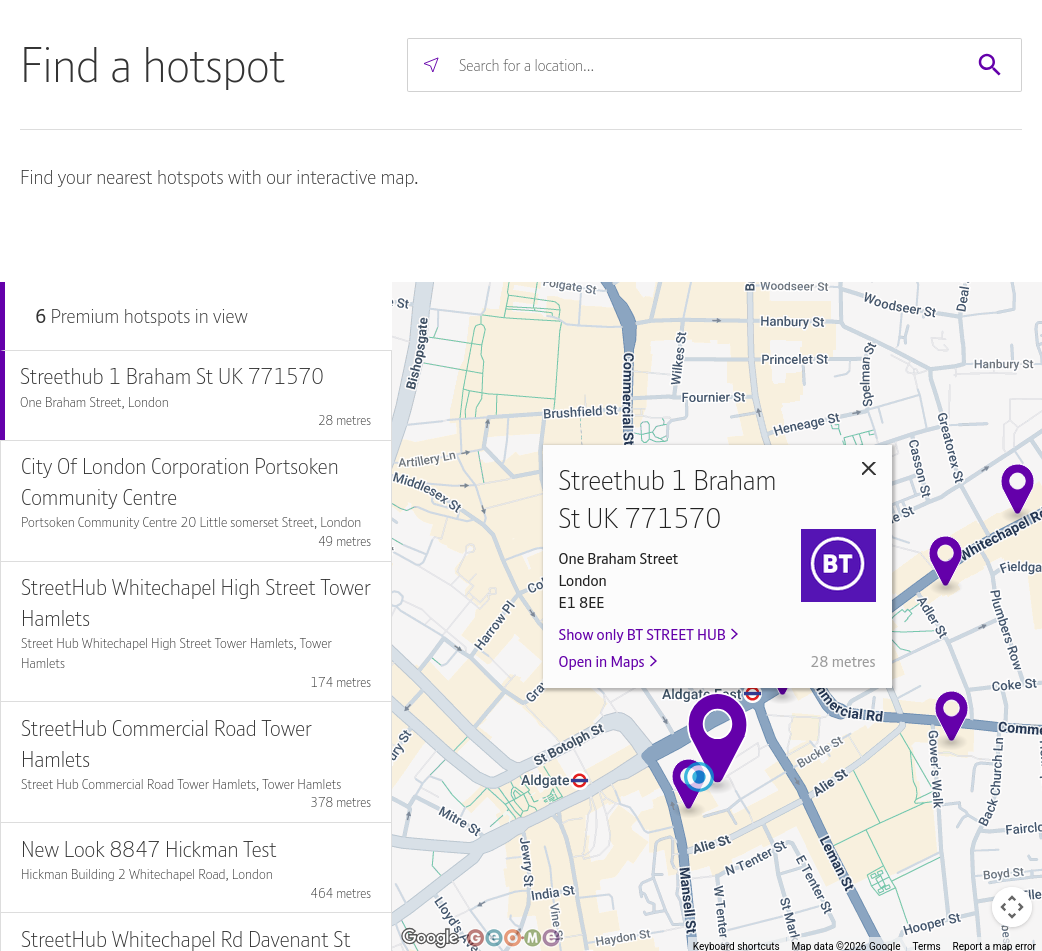
Fun fact, the one in the screenshot is inside BT’s London office.
Looking inside the iframe tells us that Geome is the company behind this map. But they don’t seem to have
API documentation, so… reading time…
The map starts off by sending a request to https://btwifihotspotlocator.geoapp.me/api/v1/premium_hotspots/within_bounds?sw[]=50.56&sw[]=-15.95&ne[]=59&ne[]=6.95&format=json.
The bounds cover the entire UK and Northern Ireland, and this is the response:
[
	{
	  "centroid": [
	    50.812455,
	    -0.421382
	  ],
	  "bounds": {
	    "sw": [
	      50.784411,
	      -1.184071
	    ],
	    "ne": [
	      50.852806,
	      -0.117547
	    ]
	  },
	  "size": 34,
	  "id": "50_812455--0_421382"
	},
	[...]
]
You get an array full of these “centroid” things, which are the bubbles that group together locations in the map UI.
When you click on one, the bounds of the centroid are used to narrow down the area. So the sw[] and ne[] parts of the URL get replaced.
After that, you start getting real results:
[
	{
		"id": 34617338,
		"lat": 51.865379,
		"lng": -2.241184,
		"name": "Streethub Station Road UK211095",
		"address": "Station Road",
		"city": "Gloucester",
		"postcode": "GL1 1SZ",
		"estate_id": 447,
		"estate_name": "BT STREET HUB",
		"estate_filterable": true,
		"type": null,
		"estate_logo_url": "https://analytics.btwifi.com/rails/active_storage/blobs/redirect/eyJfcmFpbHMiOnsiZGF0YSI6OTg4LCJwdXIiOiJibG9iX2lkIn19--487e79d1a25c349ed5c4001587b752ceb57f3586/BT.PNG"
	}
]
estate_id is important here. When set to filter for Street Hubs only, the UI adds &estate_id=447 to its requests.
With that in mind, I made another script to collect all hotspots that are Street Hubs.
What units can’t make mobile calls?
| name | address | city | postcode | coords |
|---|---|---|---|---|
| Streethub Northolt Rd UK 023015S | 248D Northolt Rd | Harrow | HA2 8DU | 51.564751, -0.35363 |
| Streethub High Street UK 043364S | 150 (O/S Vodaphone) High Street | Ealing | W3 6RF | 51.507279, -0.270475 |
| Streethub 4 Bridge St Peterborough UK105152 | SHUB OPP Middletons 4 Bridge St | Peterborough | PE1 1HJ | 52.571827, -0.241964 |
| Streethub Bradford Mall UK568473 | Pavement o/s Heron Foods- Bradford Mall Saddlers Shopping Centre | Walsall | WS1 1YT | 52.583938, -1.983914 |
| Streethub Grove Green Road UK 589027 | Grove Green Road | London | E11 1SL | 51.568696, 0.006854 |
| Streethub Bridge Street Peterborough UK651550S | SHUB OS Dominoa??s Pizza 94 Bridge St | Peterborough | PE1 1DY | 52.569413, -0.24218 |
| Streethub Footpath along Railway Rd Ewood Blackburn UK 694344 | Footpath along Railway Rd | Blackburn | BB1 5AX | 53.748097, -2.480457 |
| Streethub Yorkshire Street Rochdale UK710380 | SHUB Pavement opposite Santander 63 to 65 Yorkshire Street | Rochdale | OL16 1BZ | 53.618633, -2.157001 |
| Streethub Baillie Street Rochdale UK713211 | SHUB Pavement o/s former Wheatshead Shopping Centre Baillie Street | Rochdale | OL16 1JZ | 53.618482, -2.15564 |
| Streethub High Street Watford UK790323 | High Street | Watford | WD17 1LN | 51.658409, -0.399942 |
What units can’t make mobile or landline calls?
| name | address | city | postcode | coords |
|---|---|---|---|---|
| Streethub Midsummer Boulevard Milton Keynes UK213304 | SHUB Pavement outside 150 Midsummer Boulevard | Milton Keynes | MK9 3BA | 52.044045, -0.753013 |
| Streethub Linthorpe Rd Middlesbrough UK253076 | Linthorpe Rd | Middlesbrough | TS1 5AD | 54.576165, -1.237464 |
| Streethub Outside Holiday Express Albert Rd Middlesbrough UK 276002 | Outside Holiday Express Albert Rd | Middlesbrough | TS1 2PA | 54.575543, -1.235108 |
| Streethub Queens Drive UK 505705 | Queens Drive | Ealing | W5 3HU | 51.516855, -0.290709 |
| Streethub Station Road Bexley UK686750S | SHUB Footpath outside The Hair Movement Salon Station Road | Sidcup | DA15 7AE | 51.433702, 0.103094 |